 Photo Vault
Keep the old device available. Export a secure archive, import it on the new device with the matching password or pattern, and check the result before removing any originals.
Start with a small trial
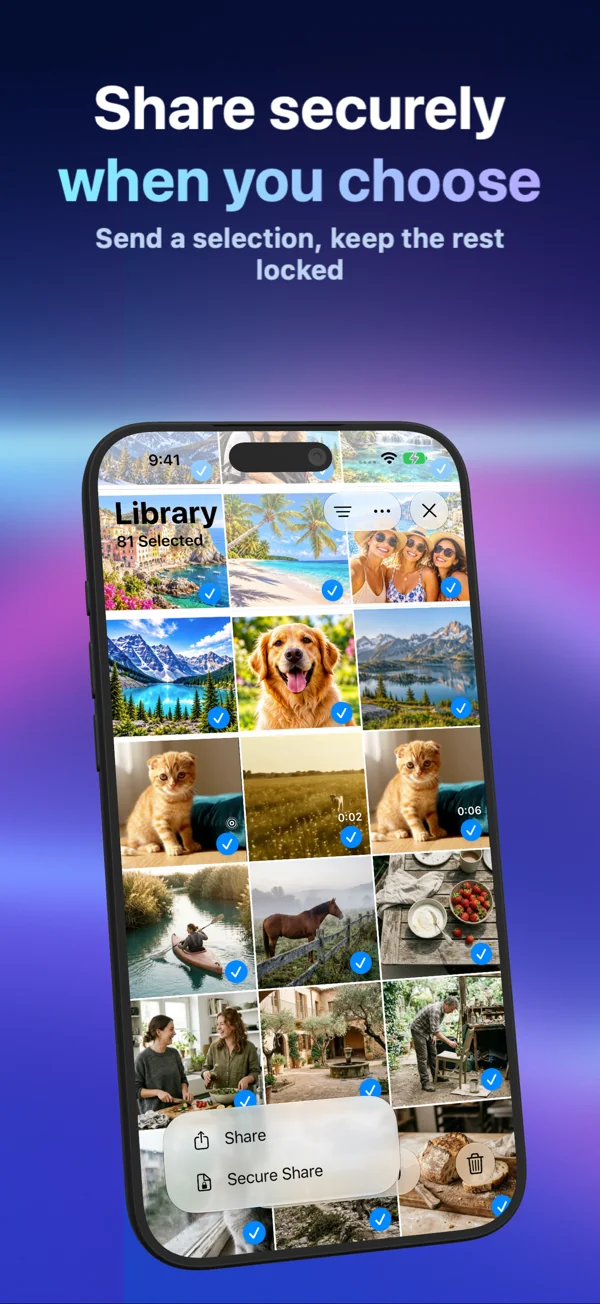
On the old device, unlock Photo Vault and select a representative sample: a photo, a video with sound, and a Live Photo if you use them. Choose Secure Share and set and confirm protection for the exported archive.
Save the .pvsecure file somewhere you can access from the new device. A cloud-backed Files folder can upload the encrypted file under that provider’s settings. Keep the archive credential separately.
Import on the new device
Set up Photo Vault on the new device. Choose Secure Import, select the exported archive from Files and enter the archive’s password or pattern. The app unlock method and the archive credential are separate.
Check the resulting media at full size. Play video and Live Photo motion, and inspect dates and locations that matter to you. Then transfer the remaining selection in manageable batches.
Transfer is not ongoing sync
Each installation keeps its own library. Secure Import adds a copy; subsequent edits or deletions on the old device do not synchronize with the new one. This procedure is a media transfer, not a promise to clone every setting or the full app state.
Do not rely on raw archive copying
The local library uses a device-only installation key. Copying its internal files is different from exporting a portable .pvsecure archive. Do not assume that Quick Start or a device backup carries everything needed to decrypt those internal files.
Keep your old installation and independent copies until you have checked the new library. Do not erase the old phone merely because a transfer dialog completed.
If the old device is unavailable
Look for a previously exported secure archive and its credential, or independent media in Photos, Files or other storage. Photo Vault has no account-based gallery or cloud recovery service. Contact support before overwriting a backup or resetting a device that may still contain a useful copy.